Normal view

Introducing Anthropic’s Claude Opus 4.7 model in Amazon Bedrock

Today, we’re announcing Claude Opus 4.7 in Amazon Bedrock, Anthropic’s most intelligent Opus model for advancing performance across coding, long-running agents, and professional work.

Claude Opus 4.7 is powered by Amazon Bedrock’s next generation inference engine, delivering enterprise-grade infrastructure for production workloads. Bedrock’s new inference engine has brand-new scheduling and scaling logic which dynamically allocates capacity to requests, improving availability particularly for steady-state workloads while making room for rapidly scaling services. It provides zero operator access—meaning customer prompts and responses are never visible to Anthropic or AWS operators—keeping sensitive data private.

According to Anthropic, Claude Opus 4.7 model provides improvements across the workflows that teams run in production such as agentic coding, knowledge work, visual understanding,long-running tasks. Opus 4.7 works better through ambiguity, is more thorough in its problem solving, and follows instructions more precisely.

  • Agentic coding: The model extends Opus 4.6’s lead in agentic coding, with stronger performance on long-horizon autonomy, systems engineering, and complex code reasoning tasks. According to Anthropic, the model records high-performance scores with 64.3% on SWE-bench Pro, 87.6% on SWE-bench Verified, and 69.4% on Terminal-Bench 2.0.
  • Knowledge work: The model advances professional knowledge work, with stronger performance on document creation, financial analysis, and multi-step research workflows. The model reasons through underspecified requests, making sensible assumptions and stating them clearly, and self-verifies its output to improve quality on the first step. According to Anthropic, the model reaches 64.4% on Finance Agent v1.1.
  • Long-running tasks: The model stays on track over longer horizons, with stronger performance over its full 1M token context window as it reasons through ambiguity and self-verifies its output.
  • Vision: the model adds high-resolution image support, improving accuracy on charts, dense documents, and screen UIs where fine detail matters.

The model is an upgrade from Opus 4.6 but may require prompting changes and harness tweaks to get the most out of the model. To learn more, visit Anthropic’s prompting guide.

Claude Opus 4.7 model in action
You can get started with Claude Opus 4.7 model in Amazon Bedrock console. Choose Playground under Test menu and choose Claude Opus 4.7 when you select model. Now, you can test your complex coding prompt with the model.

I run the following prompt example about technical architecture decision:
Design a distributed architecture on AWS in Python that should support 100k requests per second across multiple geographic regions.

You can also access the model programmatically using the Anthropic Messages API to call the bedrock-runtime through Anthropic SDK or bedrock-mantle endpoints, or keep using the Invoke and Converse API on bedrock-runtime through the AWS Command Line Interface (AWS CLI) and AWS SDK.

To get started with making your first API call to Amazon Bedrock in minutes, choose Quickstart in the left navigation pane in the console. After choosing your use case, you can generate a short term API key to authenticate your requests as testing purpose.

When you choose the API method such as the OpenAI-compatible Responses API, you can get sample codes to run your prompt to make your inference request using the model.


To invoke the model through the Anthropic Claude Messages API, you can proceed as follows using anthropic[bedrock] SDK package for a streamlined experience:

from anthropic import AnthropicBedrockMantle
# Initialize the Bedrock Mantle client (uses SigV4 auth automatically)
mantle_client = AnthropicBedrockMantle(aws_region="us-east-1")
# Create a message using the Messages API
message = mantle_client.messages.create(
    model="anthropic.claude-opus-4-7",
    max_tokens=10000,
    messages=[ 
	    {"role": "user", "content": "Design a distributed architecture on AWS in Python that should support 100k requests per second across multiple geographic regions"}
    ]
)
print(message.content[0].text)

You can also run the following command to invoke the model directly to bedrock-runtime endpoint using the AWS CLI and the Invoke API:

aws bedrock-runtime invoke-model \ 
 --model-id anthropic.claude-opus-4-7 \ 
 --region us-east-1 \ 
 --body '{"anthropic_version":"bedrock-2023-05-31", "messages": [{"role": "user", "content": "Design a distributed architecture on AWS in Python that should support 100k requests per second across multiple geographic regions."}], "max_tokens": 32000}' \ 
 --cli-binary-format raw-in-base64-out \ 
invoke-model-output.txt

For more intelligent reasoning capability, you can use Adaptive thinking with Claude Opus 4.7, which lets Claude dynamically allocate thinking token budgets based on the complexity of each request.

To learn more, visit the Anthropic Claude Messages API and check out code examples for multiple use cases and a variety of programming languages.

Things to know
Let me share some important technical details that I think you’ll find useful.

  • Choosing APIs: You can choose from a variety of Bedrock APIs for model inference, as well as the Anthropic Messages API. The Bedrock-native Converse API supports multi-turn conversations and Guardrails integration. The Invoke API provides direct model invocation and lowest-level control.
  • Scaling and capacity: Bedrock’s new inference engine is designed to rapidly provision and serve capacity across many different models. When accepting requests, we prioritize keeping steady state workloads running, and ramp usage and capacity rapidly in response to changes in demand. During periods of high demand, requests are queued, rather than rejected.

Now available
Anthropic’s Claude Opus 4.7 model is available today in the US East (N. Virginia), Asia Pacific (Tokyo), Europe (Ireland), and Europe (Stockholm) Regions; check the full list of Regions for future updates. To learn more, visit the Claude by Anthropic in Amazon Bedrock page and the Amazon Bedrock pricing page.

Give Anthropic’s Claude Opus 4.7 a try in the Amazon Bedrock console today and send feedback to AWS re:Post for Amazon Bedrock or through your usual AWS Support contacts.

Channy

Updated on April 17, 2026 – Fixed code samples and CLI commends to align new version.

Updated on May 30, 2026 – Removed requests per minute (RPM) quotas in Bedrock.

Amazon Bedrock Guardrails supports cross-account safeguards with centralized control and management

Today, we’re announcing the general availability of cross-account safeguards in Amazon Bedrock Guardrails, a new capability that enables centralized enforcement and management of safety controls across multiple AWS accounts within an organization.

With this new capability, you can specify a guardrail in a new Amazon Bedrock policy within the management account of your organization that automatically enforces configured safeguards across all member entities for every model invocation with Amazon Bedrock. This organization-wide implementation supports uniform protection across all accounts and generative AI applications with centralized control and management. This capability also offers flexibility to apply account-level and application-specific controls depending on use case requirements in addition to organizational safeguards.

  • Organization-level enforcements apply a single guardrail from your organization’s management account to all entities within the organization through policy settings. This guardrail automatically enforces filters across all member entities, including organizational units (OUs) and individual accounts, for all Amazon Bedrock model invocations.
  • Account-level enforcement enables automatic enforcement of configured safeguards across all Amazon Bedrock model invocations in your AWS account. The configured safeguards in the account-level guardrail apply to all inference API calls.

You can now establish and centrally manage dependable, comprehensive protection through a single, unified approach. This supports consistent adherence to corporate responsible AI requirements while significantly reducing the administrative burden of monitoring individual accounts and applications. Your security team no longer needs to oversee and verify configurations or compliance for each account independently.

Getting started with centralized enforcement in Amazon Bedrock Guardrails
You can get started with account-level and organization-level enforcement configuration in the Amazon Bedrock Guardrails console. Before the enforcement configuration, you need to create a guardrail with a particular version to support the guardrail configuration remains immutable and cannot be modified by member accounts and complete prerequisites for using the new capability such as resource-based policies for guardrails.

To enable account-level enforcement, choose Create in the section of Account-level enforcement configurations.

You can choose the guardrail and version to automatically apply to all Bedrock inference calls from this account in this Region. With general availability, we introduce the new feature defining which models will be affected by the enforcement with either Include or Exclude behavior.

You can also configure selective content guarding controls for system prompts and user prompts with either Comprehensive or Selective.

  • Use Comprehensive when you want to enforce guardrails on everything, regardless of what the caller tags. This is the safer default when you don’t want to rely on callers to correctly identify sensitive content.
  • Use Selective when you trust callers to tag the right content and want to reduce unnecessary guardrail processing. This is useful when callers handle a mix of pre-validated and user-generated content, and only need guardrails applied to specific portions.

After creating the enforcement, you can test and verify enforcement using a role in your account. The account-enforced guardrail should automatically apply to both prompts and outputs.

Check the response for guardrail assessment information. The guardrail response will include enforced guardrail information. You can also test by making a Bedrock inference call using InvokeModel, InvokeModelWithResponseStream, Converse, or ConverseStream APIs.

To enable organization-level enforcement, go to AWS Organizations console and choose Policies menu. You can enable the Bedrock policies in the console.

You can create a Bedrock policy that specifies your guardrail and attach it to your target accounts or OUs. Choose Bedrock policies enabled and Create policy. Specify your guardrail ARN and version and configure the input tags setting for in the AWS Organizations. To learn more, visit Amazon Bedrock policies in AWS Organizations and Amazon Bedrock policy syntax and examples.

After creating the policy, you can attach the policy to your desired organizational units, accounts, root in the Targets tab.

Search and select your organization root, OUs, or individual accounts to attach your policy, and choose Attach policy.

You can test that the guardrail is being enforced on member accounts and verify which guardrail is enforced. From a member account attached, you should see the organization enforced guardrail under the section Organization-level enforcement configurations.

The underlying safeguards within the specified guardrail are then automatically enforced for every model inference request across all member entities, ensuring consistent safety controls. To accommodate varying requirements of individual teams or applications, you can attach different policies with associated guardrails to different member entities through your organization.

Things to know
Here are key considerations to know about GA features:

  • You can now choose to include or exclude specific models in Bedrock for inference, enabling centralized enforcement on model invocation calls. You can also choose to safeguard partial or complete system prompts and input prompts. To learn more, visit Apply cross-account safeguards with Amazon Bedrock Guardrails enforcement.
  • Ensure you are specifying the accurate guardrail Amazon Resource Names (ARN) in the policy. Specifying an incorrect or invalid ARN will result in policy violations, non-enforcement of safeguards, and the inability to use the models in Amazon Bedrock for inference. To learn more, visit Best practices for using Amazon Bedrock policies.
  • Automated Reasoning checks are not supported with this capability.

Now available
Cross-account safeguards in Amazon Bedrock Guardrails is generally available today in the all AWS commercial and GovCloud Regions where Bedrock Guardrails is available. For Regional availability and a future roadmap, visit the AWS Capabilities by Region. Charges apply to each enforced guardrail according to its configured safeguards. For detailed pricing information on individual safeguards, visit Amazon Bedrock Pricing page.

Give this capability a try in the Amazon Bedrock console and send feedback to AWS re:Post for Amazon Bedrock Guardrails or through your usual AWS Support contacts.

Channy

Introducing OpenClaw on Amazon Lightsail to run your autonomous private AI agents

Today, we’re announcing the general availability of OpenClaw on Amazon Lightsail to launch OpenClaw instance, pairing your browser, enabling AI capabilities, and optionally connecting messaging channels. Your Lightsail OpenClaw instance is pre-configured with Amazon Bedrock as the default AI model provider. Once you complete setup, you can start chatting with your AI assistant immediately — no additional configuration required.

OpenClaw is an open-source self-hosted autonomous private AI agent that acts as a personal digital assistant by running directly on your computer. You can run AI agents on OpenClaw through your browser to connect to messaging apps like WhatsApp, Discord, or Telegram to perform tasks such as managing emails, browsing the web, and organizing files, rather than just answering questions.

AWS customers have asked if they can run OpenClaw on AWS. Some of them blogged about running OpenClaw on Amazon EC2 instances. As someone who has experienced installing OpenClaw directly on my home device, I learned that this is not easy and that there are many security considerations.

So, let me introduce how to launch a pre-configured OpenClaw instance on Amazon Lightsail more easily and run it securely.

OpenClaw on Amazon Lightsail in action
To get started, go to the Amazon Lightsail console and choose Create instance on the Instances section. After choosing your preferred AWS Region and Availability Zone, Linux/Unix platform to run your instance, choose OpenClaw under Select a blueprint.

You can choose your instance plan (4 GB memory plan is recommended for optimal performance) and enter a name for your instance. Finally choose Create instance. Your instance will be in a Running state in a few minutes.

Before you can use the OpenClaw dashboard, you should pair your browser with OpenClaw. This creates a secure connection between your browser session and OpenClaw. To pair your browser with OpenClaw, choose Connect using SSH in the Getting started tab.

When a browser-based SSH terminal opens, you can see the dashboard URL, security credentials displayed in the welcome message. Copy them and open the dashboard in a new browser tab. In the OpenClaw dashboard, you can paste the copied access token into the Gateway Token field in the OpenClaw dashboard.

When prompted, press y to continue and a to approve with device pairing in the SSH terminal. When pairing is complete, you can see the OK status in the OpenClaw dashboard and your browser is now connected to your OpenClaw instance.

Your OpenClaw instance on Lightsail is configured to use Amazon Bedrock to power its AI assistant. To enable Bedrock API access, copy the script in the Getting started tab and run copied script into the AWS CloudShell terminal.

Once the script is complete, go to Chat in the OpenClaw dashboard to start using your AI assistant!

You can set up OpenClaw to work with messaging apps like Telegram and WhatsApp for interacting with your AI assistant directly from your phone or messaging client. To learn more, visit Get started with OpenClaw on Lightsail in the Amazon Lightsail User Guide.

Things to know
Here are key considerations to know about this feature:

  • Permission — You can customize AWS IAM permissions granted to your OpenClaw instance. The setup script creates an IAM role with a policy that grants access to Amazon Bedrock. You can customize this policy at any time. But, you should be careful when modifying permissions because it may prevent OpenClaw from generating AI responses. To learn more, visit AWS IAM policies in the AWS documentation.
  • Cost — You pay for the instance plan you selected on an on-demand hourly rate only for what you use. Every message sent to and received from the OpenClaw assistant is processed through Amazon Bedrock using a token-based pricing model. If you select a third-party model distributed through AWS Marketplace such as Anthropic Claude or Cohere, there may be additional software fees on top of the per-token cost.
  • Security — Running a personal AI agent on OpenClaw is powerful, but it may cause security threat if you are careless. I recommend to hide your OpenClaw gateway never to expose it to open internet. The gateway auth token is your password, so rotate it often and store it in your environment file not hardcoded in config file. To learn more about security tips, visit Security on OpenClaw gateway.

Now available
OpenClaw on Amazon Lightsail is now available in all AWS commercial Regions where Amazon Lightsail is available. For Regional availability and a future roadmap, visit the AWS Capabilities by Region.

Give a try in the Lightsail console and send feedback to AWS re:Post for Amazon Lightsail or through your usual AWS support contacts.

Channy

AWS Weekly Roundup: Claude Sonnet 4.6 in Amazon Bedrock, Kiro in GovCloud Regions, new Agent Plugins, and more (February 23, 2026)

Last week, my team met many developers at Developer Week in San Jose. My colleague, Vinicius Senger delivered a great keynote about renascent software—a new way of building and evolving applications where humans and AI collaborate as co-developers using Kiro. Other colleagues, Du’An Lightfoot, Elizabeth Fuentes, Laura Salinas, and Sandhya Subramani spoke about building and deploying production-ready AI agents. Everyone stayed to ask and hear the questions related to agent memory, multi-agent patterns, meta-tooling and hooks. It was interesting how many developers were actually building agents.

We are continuing to meet developers and hear their feedback at third-party developer conferences. You can meet us at the dev/nexus, the largest and longest-running Java ecosystem conference on March 4-6 in Atlanta. My colleague, James Ward will speak about building AI Agents with Spring and MCP, and Vinicius Senger and Jonathan Vogel will speak about 10 tools and tips to upgrade your Java code with AI. I’ll keep sharing places for you to connect with us.

Last week’s launches
Here are some of the other announcements from last week:

  • Claude Sonnet 4.6 model in Amazon Bedrock – You can now use Claude Sonnet 4.6 which offers frontier performance across coding, agents, and professional work at scale. Claude Sonnet 4.6 approaches Opus 4.6 intelligence at a lower cost. It enables faster, high-quality task completion, making it ideal for high-volume coding and knowledge work use cases.
  • Amazon EC2 Hpc8a instances powered by 5th Gen AMD EPYC processors – You can use new Hpc8a instances delivering up to 40% higher performance, increased memory bandwidth, and 300 Gbps Elastic Fabric Adapter networking. You can accelerate compute-intensive simulations, engineering workloads, and tightly coupled HPC applications.
  • Amazon SageMaker Inference for custom Amazon Nova models – You can now configure the instance types, auto-scaling policies, and concurrency settings for custom Nova model deployments with Amazon SageMaker Inference to best meet your needs.
  • Nested virtualization on virtual Amazon EC2 instances – You can create nested virtual machines by running KVM or Hyper-V on virtual EC2 instances. You can leverage this capability for use cases such as running emulators for mobile applications, simulating in-vehicle hardware for automobiles, and running Windows Subsystem for Linux on Windows workstations.
  • Server-Side Encryption by default in Amazon Aurora – Amazon Aurora further strengthens your security posture by automatically applying server-side encryption by default to all new databases clusters using AWS-owned keys. This encryption is fully managed, transparent to users, and with no cost or performance impact.
  • Kiro in AWS GovCloud (US) Regions – You can use Kiro for the development teams behind government missions. Developers in regulated environments can now leverage Kiro’s agentic AI tool with the rigorous security controls required.

For a full list of AWS announcements, be sure to keep an eye on the What’s New with AWS page.

Additional updates
Here are some additional news items that you might find interesting:

  • Introducing Agent Plugins for AWS – You can see how new open-source Agent Plugins for AWS extend coding agents with skills for deploying applications to AWS. Using the deploy-on-aws plugin, you can generate architecture recommendations, cost estimates, and infrastructure-as-code directly from your coding agent.
  • A chat with Byron Cook on automated reasoning and trust in AI systems – You can hear how to verify AI systems doing the right thing using automated reasoning when they generate code or manage critical decisions. Byron Cook’s team has spent a decade proving correctness in AWS and apply those techniques to agentic systems.
  • Best practices for deploying AWS DevOps Agent in production – You can read best practices for setting up DevOps Agent Spaces that balance investigation capability with operational efficiency. According to Swami Sivasubramanian, AWS DevOps Agent, a frontier agent that resolves and proactively prevents incidents, has handled thousands of escalations, with an estimated root cause identification rate of over 86% within Amazon.

From AWS community
Here are my personal favorite posts from AWS community:

Join the AWS Builder Center to connect with community, share knowledge, and access content that supports your development.

Upcoming AWS events
Check your calendar and sign up for upcoming AWS events:

  • AWS Summits – Join AWS Summits in 2026, free in-person events where you can explore emerging cloud and AI technologies, learn best practices, and network with industry peers and experts. Upcoming Summits include Paris (April 1), London (April 22), and Bengaluru (April 23–24).
  • Amazon Nova AI Hackathon – Join developers worldwide to build innovative generative AI solutions using frontier foundation models and compete for $40,000 in prizes across five categories including agentic AI, multimodal understanding, UI automation, and voice experiences during this six-week challenge from February 2nd to March 16th, 2026.
  • AWS Community Days – Community-led conferences where content is planned, sourced, and delivered by community leaders, featuring technical discussions, workshops, and hands-on labs. Upcoming events include Ahmedabad (February 28), JAWS Days in Tokyo (March 7), Chennai (March 7), Slovakia (March 11), and Pune (March 21).

Browse here for upcoming AWS led in-person and virtual events, startup events, and developer-focused events.

That’s all for this week. Check back next Monday for another Weekly Roundup!

Channy

Announcing Amazon SageMaker Inference for custom Amazon Nova models

Since we launched Amazon Nova customization in Amazon SageMaker AI at AWS NY Summit 2025, customers have been asking for the same capabilities with Amazon Nova as they do when they customize open weights models in Amazon SageMaker Inference. They also wanted have more control and flexibility in custom model inference over instance types, auto-scaling policies, context length, and concurrency settings that production workloads demand.

Today, we’re announcing the general availability of custom Nova model support in Amazon SageMaker Inference, a production-grade, configurable, and cost-efficient managed inference service to deploy and scale full-rank customized Nova models. You can now experience an end-to-end customization journey to train Nova Micro, Nova Lite, and Nova 2 Lite models with reasoning capabilities using Amazon SageMaker Training Jobs or Amazon HyperPod and seamlessly deploy them with managed inference infrastructure of Amazon SageMaker AI.

With Amazon SageMaker Inference for custom Nova models, you can reduce inference cost through optimized GPU utilization using Amazon Elastic Compute Cloud (Amazon EC2) G5 and G6 instances over P5 instances, auto-scaling based on 5-minute usage patterns, and configurable inference parameters. This feature enables deployment of customized Nova models with continued pre-training, supervised fine-tuning, or reinforcement fine-tuning for your use cases. You can also set advanced configurations about context length, concurrency, and batch size for optimizing the latency-cost-accuracy tradeoff for your specific workloads.

Let’s see how to deploy customized Nova models on SageMaker AI real-time endpoints, configure inference parameters, and invoke your models for testing.

Deploy custom Nova models in SageMaker Inference
At AWS re:Invent 2025, we introduced new serverless customization in Amazon SageMaker AI for popular AI models including Nova models. With a few clicks, you can seamlessly select a model and customization technique, and handle model evaluation and deployment. If you already have a trained custom Nova model artifact, you can deploy the models on SageMaker Inference through the SageMaker Studio or SageMaker AI SDK.

In the SageMaker Studio, choose a trained Nova model in Models in your models in the Models menu. You can deploy the model by choosing Deploy button, SageMaker AI and Create new endpoint.

Choose the endpoint name, instance type, and advanced options such as instance count, max instance count, permission and networking, and Deploy button. At GA launch, you can use g5.12xlarge, g5.24xlarge, g5.48xlarge, g6.12xlarge, g6.24xlarge, g6.48xlarge, and p5.48xlarge instance types for the Nova Micro model, g5.48xlarge, g6.48xlarge, and p5.48xlarge for the Nova Lite model, and p5.48xlarge for the Nova 2 Lite model.

Creating your endpoint requires time to provision the infrastructure, download your model artifacts, and initialize the inference container.

After model deployment completes and the endpoint status shows InService, you can perform real-time inference using the new endpoint. To test the model, choose the Playground tab and input your prompt in the Chat mode.

You can also use the SageMaker AI SDK to create two resources: a SageMaker AI model object that references your Nova model artifacts, and an endpoint configuration that defines how the model will be deployed.

The following code sample creates a SageMaker AI model that references your Nova model artifacts. For supported container images by Region, refer table lists the container image URIs:

# Create a SageMaker AI model
    model_response = sagemaker.create_model(
        ModelName= 'Nova-micro-ml-g5-12xlarge',
        PrimaryContainer={
            'Image': '708977205387.dkr.ecr.us-east-1.amazonaws.com/nova-inference-repo:v1.0.0',
            'ModelDataSource': {
                'S3DataSource': {
                   'S3Uri': 's3://your-bucket-name/path/to/model/artifacts/',
                   'S3DataType': 'S3Prefix',
                   'CompressionType': 'None'
                }
            },
            # Model Parameters
            'Environment': {
                'CONTEXT_LENGTH': 8000,
                'MAX_CONCURRENCY': 16,
                'DEFAULT_TEMPERATURE': 0.0,
                'DEFAULT_TOP_P': 1.0
            }
        },
        ExecutionRoleArn=SAGEMAKER_EXECUTION_ROLE_ARN,
        EnableNetworkIsolation=True
    )
    print("Model created successfully!")

Next, create an endpoint configuration that defines your deployment infrastructure and deploy your Nova model by creating a SageMaker AI real-time endpoint. This endpoint will host your model and provide a secure HTTPS endpoint for making inference requests.

# Create Endpoint Configuration
    production_variant = {
        'VariantName': 'primary',
        'ModelName': 'Nova-micro-ml-g5-12xlarge',
        'InitialInstanceCount': 1,
        'InstanceType': 'ml.g5.12xlarge',
    }
    
    config_response = sagemaker.create_endpoint_config(
        EndpointConfigName= 'Nova-micro-ml-g5-12xlarge-Config',
        ProductionVariants= production_variant
    )
    print("Endpoint configuration created successfully!")
    
# Deploy your Noval model
    endpoint_response = sagemaker.create_endpoint(
        EndpointName= 'Nova-micro-ml-g5-12xlarge-endpoint',
        EndpointConfigName= 'Nova-micro-ml-g5-12xlarge-Config'
    )
    print("Endpoint creation initiated successfully!")

After the endpoint is created, you can send inference requests to generate predictions from your custom Nova model. Amazon SageMaker AI supports synchronous endpoints for real-time with streaming/non-streaming modes and asynchronous endpoints for batch processing.

For example, the following code creates streaming completion format for text generation:

# Streaming chat request with comprehensive parameters
streaming_request = {
"messages": [
        {"role": "user", "content": "Compare our Q4 2025 actual spend against budget across all departments and highlight variances exceeding 10%"}
    ],
    "max_tokens": 512,
    "stream": True,
    "temperature": 0.7,
    "top_p": 0.95,
    "top_k": 40,
    "logprobs": True,
    "top_logprobs": 2,
    "reasoning_effort": "low",  # Options: "low", "high"
    "stream_options": {"include_usage": True}
}

invoke_nova_endpoint(streaming_request)

def invoke_nova_endpoint(request_body):
"""
    Invoke Nova endpoint with automatic streaming detection.
    
    Args:
        request_body (dict): Request payload containing prompt and parameters
    
    Returns:
        dict: Response from the model (for non-streaming requests)
        None: For streaming requests (prints output directly)
    """
    body = json.dumps(request_body)
    is_streaming = request_body.get("stream", False)
    
    try:
        print(f"Invoking endpoint ({'streaming' if is_streaming else 'non-streaming'})...")
        
        if is_streaming:
            response = runtime_client.invoke_endpoint_with_response_stream(
                EndpointName=ENDPOINT_NAME,
                ContentType='application/json',
                Body=body
            )
            
            event_stream = response['Body']
            for event in event_stream:
                if 'PayloadPart' in event:
                    chunk = event['PayloadPart']
                    if 'Bytes' in chunk:
                        data = chunk['Bytes'].decode()
                        print("Chunk:", data)
        else:
            # Non-streaming inference
            response = runtime_client.invoke_endpoint(
                EndpointName=ENDPOINT_NAME,
                ContentType='application/json',
                Accept='application/json',
                Body=body
            )
            
            response_body = response['Body'].read().decode('utf-8')
            result = json.loads(response_body)
            print("✅ Response received successfully")
            return result
    
    except ClientError as e:
        error_code = e.response['Error']['Code']
        error_message = e.response['Error']['Message']
        print(f"❌ AWS Error: {error_code} - {error_message}")
    except Exception as e:
        print(f"❌ Unexpected error: {str(e)}")

To use full code examples, visit Getting started with customizing Nova models on SageMaker AI. To learn more about best practices on deploying and managing models, visit Best practices for SageMaker AI.

Now available
Amazon SageMaker Inference for custom Nova models is available today in US East (N. Virginia) and US West (Oregon) AWS Regions. For Regional availability and a future roadmap, visit the AWS Capabilities by Region.

The feature supports Nova Micro, Nova Lite, and Nova 2 Lite models with reasoning capabilities, running on EC2 G5, G6, and P5 instances with auto-scaling support. You pay only for the compute instances you use, with per-hour billing and no minimum commitments. For more information, visit Amazon SageMaker AI Pricing page.

Give it a try in Amazon SageMaker AI console and send feedback to AWS re:Post for SageMaker or through your usual AWS Support contacts.

Channy

AWS Weekly Roundup: Claude Opus 4.6 in Amazon Bedrock, AWS Builder ID Sign in with Apple, and more (February 9, 2026)

Here are the notable launches and updates from last week that can help you build, scale, and innovate on AWS.

Last week’s launches
Here are the launches that got my attention this week.

Let’s start with news related to compute and networking infrastructure:

  • Introducing Amazon EC2 C8id, M8id, and R8id instances: These new Amazon EC2 C8id, M8id, and R8id instances are powered by custom Intel Xeon 6 processors. These instances offer up to 43% higher performance and 3.3x more memory bandwidth compared to previous generation instances.
  • AWS Network Firewall announces new price reductions: The service has added the hourly and data processing discounts on NAT Gateways that are service-chained with Network Firewall secondary endpoints. Additionally, AWS Network Firewall has removed additional data processing charges for Advanced Inspection, which enables Transport Layer Security (TLS) inspection of encrypted network traffic.
  • Amazon ECS adds Network Load Balancer support for Linear and Canary deployments: Applications that commonly use NLB, such as those requiring TCP/UDP-based connections, low latency, long-lived connections, or static IP addresses, can take advantage of managed, incremental traffic shifting natively from ECS when rolling out updates.
  • AWS Config now supports 30 new resource types: These range across key services including Amazon EKS, Amazon Q, and AWS IoT. This expansion provides greater coverage over your AWS environment, enabling you to more effectively discover, assess, audit, and remediate an even broader range of resources.
  • Amazon DynamoDB global tables now support replication across multiple AWS accounts: DynamoDB global tables are a fully managed, serverless, multi-Region, and multi-active database. With this new capability, you can replicate tables across AWS accounts and Regions to improve resiliency, isolate workloads at the account level, and apply distinct security and governance controls.
  • Amazon RDS now provides an enhanced console experience to connect to a database: The new console experience provides ready-made code snippets for Java, Python, Node.js, and other programming languages as well as tools like the psql command line utility. These code snippets are automatically adjusted based on your database’s authentication settings. For example, if your cluster uses IAM authentication, the generated code snippets will use token-based authentication to connect to the database. The console experience also includes integrated CloudShell access, offering the ability to connect to your databases directly from within the RDS console.

Then, I noticed three news items related to security and how you authenticate on AWS:

  • AWS Builder ID now supports Sign in with Apple: AWS Builder ID, your profile for accessing AWS applications including AWS Builder Center, AWS Training and Certification, AWS re:Post, AWS Startups, and Kiro, now supports sign-in with Apple as a social login provider. This expansion of sign-in options builds on the existing sign-in with Google capability, providing Apple users with a streamlined way to access AWS resources without managing separate credentials on AWS.
  • AWS STS now supports validation of select identity provider specific claims from Google, GitHub, CircleCI and OCI: You can reference these custom claims as condition keys in IAM role trust policies and resource control policies, expanding your ability to implement fine-grained access control for federated identities and help you establish your data perimeters. This enhancement builds upon IAM’s existing OIDC federation capabilities, which allow you to grant temporary AWS credentials to users authenticated through external OIDC-compatible identity providers.
  • AWS Management Console now displays Account Name on the Navigation bar for easier account identification: You now have an easy way to identify your accounts at a glance. You can now quickly distinguish between accounts visually using the account name that appears in the navigation bar for all authorized users in that account.
  • Amazon CloudFront announces mutual TLS support for origins: Now with origin mTLS support, you can implement a standardized, certificate-based authentication approach that eliminates operational burden. This enables organizations to enforce strict authentication for their proprietary content, ensuring that only verified CloudFront distributions can establish connections to backend infrastructure ranging from AWS origins and on-premises servers to third-party cloud providers and external CDNs.

Finally, there is not a single week without news around AI :

  • Claude Opus 4.6 now available in Amazon Bedrock: Opus 4.6 is Anthropic’s most intelligent model to date and a premier model for coding, enterprise agents, and professional work. Claude Opus 4.6 brings advanced capabilities to Amazon Bedrock customers, including industry-leading performance for agentic tasks, complex coding projects, and enterprise-grade workflows that require deep reasoning and reliability.
  • Structured outputs now available in Amazon Bedrock: Amazon Bedrock now supports structured outputs, a capability that provides consistent, machine-readable responses from foundation models that adhere to your defined JSON schemas. Instead of prompting for valid JSON and adding extra checks in your application, you can specify the format you want and receive responses that match it—making production workflows more predictable and resilient.

For a full list of AWS announcements, be sure to keep an eye on the What’s New with AWS? page.

Upcoming AWS events
Check your calendars so that you can sign up for this upcoming event:

AWS Community Day Romania (April 23–24, 2026): This community-led AWS event brings together developers, architects, entrepreneurs, and students for more than 10 professional sessions delivered by AWS Heroes, Solutions Architects, and industry experts. Attendees can expect expert-led technical talks, insights from speakers with global conference experience, and opportunities to connect during dedicated networking breaks, all hosted at a premium venue designed to support collaboration and community engagement.

If you’re looking for more ways to stay connected beyond this event, join the AWS Builder Center to learn, build, and connect with builders in the AWS community.

Check back next Monday for another Weekly Roundup.

— seb

AWS Weekly Roundup: Kiro CLI latest features, AWS European Sovereign Cloud, EC2 X8i instances, and more (January 19, 2026)

At the end of 2025 I was happy to take a long break to enjoy the incredible summers that the southern hemisphere provides. I’m back and writing my first post in 2026 which also happens to be my last post for the AWS News Blog (more on this later).

The AWS community is starting the year strong with various AWS re:invent re:Caps being hosted around the globe, with some communities already hosting their AWS Community Day events, the AWS Community Day Tel Aviv 2026 was hosted last week.

Last week’s launches
Here are last week’s launches that caught my attention:

  • Kiro CLI latest features – Kiro CLI now has granular controls for web fetch URLs, keyboard shortcuts for your custom agents, enhanced diff views, and much more. With these enhancements, you can now use allowlists or blocklists to restrict which URLs the agent can access, ensure a frictionless experience when working with multiple specialized agents in a single session, to name a few.
  • AWS European Sovereign Cloud – Following an announcement in 2023 of plans to build a new, independent cloud infrastructure, last week we announced the general availability of the AWS European Sovereign Cloud to all customers. The cloud is ready to meet the most stringent sovereignty requirements of European customers with a comprehensive set of AWS services.
  • Amazon EC2 X8i instancesPreviously launched in preview at AWS re:Invent 2025, last week we announced the general availability of new memory-optimized Amazon Elastic Compute Cloud (Amazon EC2) X8i instances. These instances are powered by custom Intel Xeon 6 processors with a sustained all-core turbo frequency of 3.9 GHz, available only on AWS. These SAP certified instances deliver the highest performance and fastest memory bandwidth among comparable Intel processors in the cloud.

For a full list of AWS announcements, be sure to keep an eye on the What’s New with AWS? page.

Additional updates
These projects, blog posts, and news articles also caught my attention:

  • 5 core features in Amazon Quick Suite – AWS VP Agentic AI Swami Sivasubramanian talks about how he uses Amazon Quick Suite for just about everything. In October 2025 we announced Amazon Quick Suite, a new agentic teammate that quickly answers your questions at work and turns insights into actions for you. Amazon Quick Suite has become one of my favorite productivity tools, helping me with my research on various topics in addition to providing me with multiple perspectives on a topic.
  • Deploy AI agents on Amazon Bedrock AgentCore using GitHub Actions – Last year we announced Amazon Bedrock AgentCore, a flexible service that helps you seamlessly create and manage AI agents across different frameworks and models, whether hosted on Amazon Bedrock or other environments. Learn how to use a GitHub Actions workflow to automate the deployment of AI agents on AgentCore Runtime. This approach delivers a scalable solution with enterprise-level security controls, providing complete continuous integration and delivery (CI/CD) automation.

Upcoming AWS events
Join us January 28 or 29 (depending on your time zone) for Best of AWS re:Invent, a free virtual event where we bring you the most impactful announcements and top sessions from AWS re:Invent. Jeff Barr, AWS VP and Chief Evangelist, will share his highlights during the opening session.

There is still time until January 21 to compete for $250,000 in prizes and AWS credits in the Global 10,000 AIdeas Competition (yes, the second letter is an I as in Idea, not an L as in like). No code required yet: simply submit your idea, and if you’re selected as a semifinalist, you’ll build your app using Kiro within AWS Free Tier limits. Beyond the cash prizes and potential featured placement at AWS re:Invent 2026, you’ll gain hands-on experience with next-generation AI tools and connect with innovators globally.

Earlier this month, the 2026 application for the Community Builders program launched. The application is open until January 21st, midnight PST so here’s your last chance to ensure that you don’t miss out.

If you’re interested in these opportunities, join the AWS Builder Center to learn with builders in the AWS community.

With that, I close one of my most meaningful chapters here at AWS. It’s been an absolute pleasure to write for you and I thank you for taking the time to read the work that my team and I pour our absolute hearts into. I’ve grown from the close collaborations with the launch teams and the feedback from all of you. The Sub-Sahara Africa (SSA) community has grown significantly, and I want to dedicate more time focused on this community, I’m still at AWS and I look forward to meeting at an event near you!

Check back next Monday for another Weekly Roundup!

Veliswa Boya

Amazon Bedrock adds reinforcement fine-tuning simplifying how developers build smarter, more accurate AI models

Organizations face a challenging trade-off when adapting AI models to their specific business needs: settle for generic models that produce average results, or tackle the complexity and expense of advanced model customization. Traditional approaches force a choice between poor performance with smaller models or the high costs of deploying larger model variants and managing complex infrastructure. Reinforcement fine-tuning is an advanced technique that trains models using feedback instead of massive labeled datasets, but implementing it typically requires specialized ML expertise, complicated infrastructure, and significant investment—with no guarantee of achieving the accuracy needed for specific use cases.

Today, we’re announcing reinforcement fine-tuning in Amazon Bedrock, a new model customization capability that creates smarter, more cost-effective models that learn from feedback and deliver higher-quality outputs for specific business needs. Reinforcement fine-tuning uses a feedback-driven approach where models improve iteratively based on reward signals, delivering 66% accuracy gains on average over base models.

Amazon Bedrock automates the reinforcement fine-tuning workflow, making this advanced model customization technique accessible to everyday developers without requiring deep machine learning (ML) expertise or large labeled datasets.

How reinforcement fine-tuning works
Reinforcement fine-tuning is built on top of reinforcement learning principles to address a common challenge: getting models to consistently produce outputs that align with business requirements and user preferences.

While traditional fine-tuning requires large, labeled datasets and expensive human annotation, reinforcement fine-tuning takes a different approach. Instead of learning from fixed examples, it uses reward functions to evaluate and judge which responses are considered good for particular business use cases. This teaches models to understand what makes a quality response without requiring massive amounts of pre-labeled training data, making advanced model customization in Amazon Bedrock more accessible and cost-effective.

Here are the benefits of using reinforcement fine-tuning in Amazon Bedrock:

  • Ease of use – Amazon Bedrock automates much of the complexity, making reinforcement fine-tuning more accessible to developers building AI applications. Models can be trained using existing API logs in Amazon Bedrock or by uploading datasets as training data, eliminating the need for labeled datasets or infrastructure setup.
  • Better model performance – Reinforcement fine-tuning improves model accuracy by 66% on average over base models, enabling optimization for price and performance by training smaller, faster, and more efficient model variants. This works with Amazon Nova 2 Lite model, improving quality and price performance for specific business needs, with support for additional models coming soon.
  • Security – Data remains within the secure AWS environment throughout the entire customization process, mitigating security and compliance concerns.

The capability supports two complementary approaches to provide flexibility for optimizing models:

  • Reinforcement Learning with Verifiable Rewards (RLVR) uses rule-based graders for objective tasks like code generation or math reasoning.
  • Reinforcement Learning from AI Feedback (RLAIF) employs AI-based judges for subjective tasks like instruction following or content moderation.

Getting started with reinforcement fine-tuning in Amazon Bedrock
Let’s walk through creating a reinforcement fine-tuning job.

First, I access the Amazon Bedrock console. Then, I navigate to the Custom models page. I choose Create and then choose Reinforcement fine-tuning job.

I start by entering the name of this customization job and then select my base model. At launch, reinforcement fine-tuning supports Amazon Nova 2 Lite, with support for additional models coming soon.

Next, I need to provide training data. I can use my stored invocation logs directly, eliminating the need to upload separate datasets. I can also upload new JSONL files or select existing datasets from Amazon Simple Storage Service (Amazon S3). Reinforcement fine-tuning automatically validates my training dataset and supports the OpenAI Chat Completions data format. If I provide invocation logs in the Amazon Bedrock invoke or converse format, Amazon Bedrock automatically converts them to the Chat Completions format.

The reward function setup is where I define what constitutes a good response. I have two options here. For objective tasks, I can select Custom code and write custom Python code that gets executed through AWS Lambda functions. For more subjective evaluations, I can select Model as judge to use foundation models (FMs) as judges by providing evaluation instructions.

Here, I select Custom code, and I create a new Lambda function or use an existing one as a reward function. I can start with one of the provided templates and customize it for my specific needs.

I can optionally modify default hyperparameters like learning rate, batch size, and epochs.

For enhanced security, I can configure virtual private cloud (VPC) settings and AWS Key Management Service (AWS KMS) encryption to meet my organization’s compliance requirements. Then, I choose Create to start the model customization job.

During the training process, I can monitor real-time metrics to understand how the model is learning. The training metrics dashboard shows key performance indicators including reward scores, loss curves, and accuracy improvements over time. These metrics help me understand whether the model is converging properly and if the reward function is effectively guiding the learning process.

When the reinforcement fine-tuning job is completed, I can see the final job status on the Model details page.

Once the job is completed, I can deploy the model with a single click. I select Set up inference, then choose Deploy for on-demand.

Here, I provide a few details for my model.

After deployment, I can quickly evaluate the model’s performance using the Amazon Bedrock playground. This helps me to test the fine-tuned model with sample prompts and compare its responses against the base model to validate the improvements. I select Test in playground.

The playground provides an intuitive interface for rapid testing and iteration, helping me confirm that the model meets my quality requirements before integrating it into production applications.

Interactive demo
Learn more by navigating an interactive demo of Amazon Bedrock reinforcement fine-tuning in action.

Additional things to know
Here are key points to note:

  • Templates — There are seven ready-to-use reward function templates covering common use cases for both objective and subjective tasks.
  • Pricing — To learn more about pricing, refer to the Amazon Bedrock pricing page.
  • Security — Training data and custom models remain private and aren’t used to improve FMs for public use. It supports VPC and AWS KMS encryption for enhanced security.

Get started with reinforcement fine-tuning by visiting the reinforcement fine-tuning documentation and by accessing the Amazon Bedrock console.

Happy building!
Donnie

Amazon Bedrock AgentCore adds quality evaluations and policy controls for deploying trusted AI agents

Updated on March 3, 2026Policy in Amazon Bedrock AgentCore is now generally available.
Updated on March 31, 2026Amazon Bedrock AgentCore Evaluations is now generally available.


Today, we’re announcing new capabilities in Amazon Bedrock AgentCore to further remove barriers holding AI agents back from production. Organizations across industries are already building on AgentCore, the most advanced agentic platform to build, deploy, and operate highly capable agents securely at any scale. In just 5 months since preview, the AgentCore SDK has been downloaded over 2 million times. For example:

  • PGA TOUR, a pioneer and innovation leader in sports has built a multi-agent content generation system to create articles for their digital platforms. The new solution, built on AgentCore, enables the PGA TOUR to provide comprehensive coverage for every player in the field, by increasing content writing speed by 1,000 percent while achieving a 95 percent reduction in costs.
  • Independent software vendors (ISVs) like Workday are building the software of the future on AgentCore. AgentCore Code Interpreter provides Workday Planning Agent with secure data protection and essential features for financial data exploration. Users can analyze financial and operational data through natural language queries, making financial planning intuitive and self-driven. This capability reduces time spent on routine planning analysis by 30 percent, saving approximately 100 hours per month.
  • Grupo Elfa, a Brazilian distributor and retailer, relies on AgentCore Observability for complete audit traceability and real-time metrics of their agents, transforming their reactive processes into proactive operations. Using this unified platform, their sales team can handle thousands of daily price quotes while the organization maintains full visibility of agent decisions, helping achieve 100 percent traceability of agent decisions and interactions, and reduced problem resolution time by 50 percent.

As organizations scale their agent deployments, they face challenges around implementing the right boundaries and quality checks to confidently deploy agents. The autonomy that makes agents powerful also makes them hard to confidently deploy at scale, as they might access sensitive data inappropriately, make unauthorized decisions, or take unexpected actions. Development teams must balance enabling agent autonomy while ensuring they operate within acceptable boundaries and with the quality you require to put them in front of customers and employees.

The new capabilities available today take the guesswork out of this process and help you build and deploy trusted AI agents with confidence:

  • Policy in AgentCore (Preview) – Defines clear boundaries for agent actions by intercepting AgentCore Gateway tool calls before they run using policies with fine-grained permissions.
  • AgentCore Evaluations (Preview) – Monitors the quality of your agents based on real-world behavior using built-in evaluators for dimensions such as correctness and helpfulness, plus custom evaluators for business-specific requirements.

We’re also introducing features that expand what agents can do:

  • Episodic functionality in AgentCore Memory – A new long-term strategy that helps agents learn from experiences and adapt solutions across similar situations for improved consistency and performance in similar future tasks.
  • Bidirectional streaming in AgentCore Runtime – Deploys voice agents where both users and agents can speak simultaneously following a natural conversation flow.

Policy in AgentCore for precise agent control
Policy gives you control over the actions agents can take and are applied outside of the agent’s reasoning loop, treating agents as autonomous actors whose decisions require verification before reaching tools, systems, or data. It integrates with AgentCore Gateway to intercept tool calls as they happen, processing requests while maintaining operational speed, so workflows remain fast and responsive.

You can create policies using natural language or directly use Cedar—an open source policy language for fine-grained permissions—simplifying the process to set up, understand, and audit rules without writing custom code. This approach makes policy creation accessible to development, security, and compliance teams who can create, understand, and audit rules without specialized coding knowledge.

The policies operate independently of how the agent was built or which model it uses. You can define which tools and data agents can access—whether they are APIs, AWS Lambda functions, Model Context Protocol (MCP) servers, or third-party services—what actions they can perform, and under what conditions.

Teams can define clear policies once and apply them consistently across their organization. With policies in place, developers gain the freedom to create innovative agentic experiences, and organizations can deploy their agents to act autonomously while knowing they’ll stay within defined boundaries and compliance requirements.

Using Policy in AgentCore
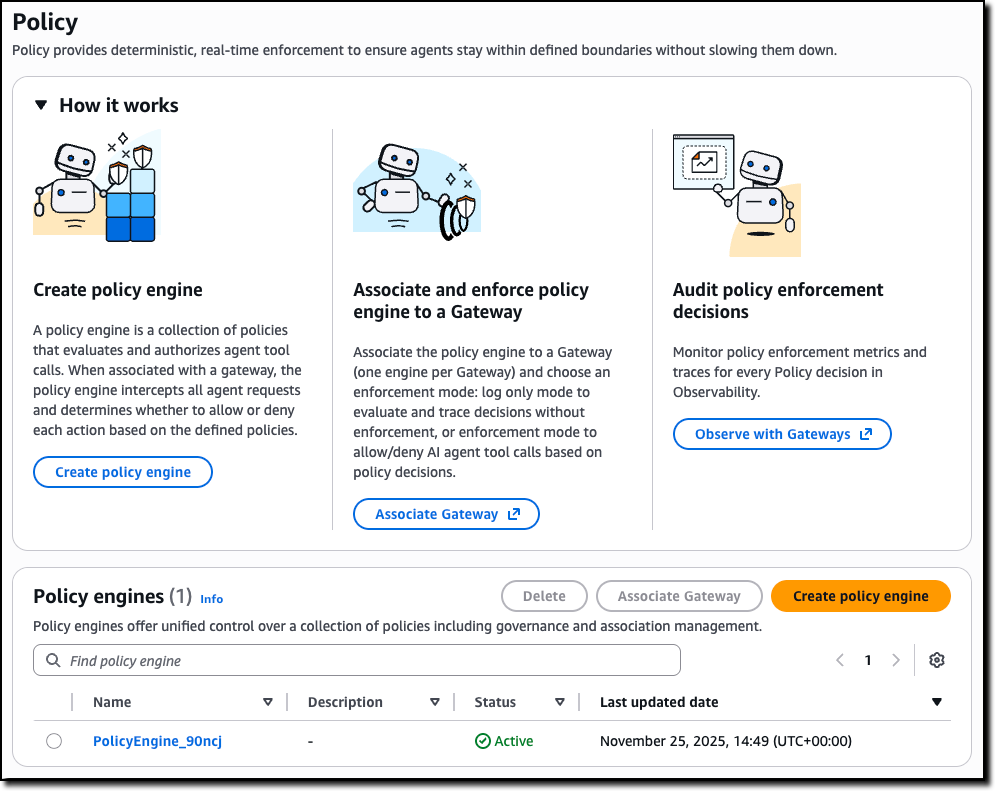
You can start by creating a policy engine in the new Policy section of the AgentCore console and associate it with one or more AgentCore gateways.

A policy engine is a collection of policies that are evaluated at the gateway endpoint. When associating a gateway with a policy engine, you can choose whether to enforce the result of the policy—effectively permitting or denying access to a tool call—or to only emit logs. Using logs helps you test and validate a policy before enabling it in production.

Then, you can define the policies to apply to have granular control over access to the tools offered by the associated AgentCore gateways.

Amazon Bedrock AgentCore Policy console

To create a policy, you can start with a natural language description (that should include information of the authentication claims to use) or directly edit Cedar code.

Amazon Bedrock AgentCore Policy add

Natural language-based policy authoring provides a more accessible way for you to create fine-grained policies. Instead of writing formal policy code, you can describe rules in plain English. The system interprets your intent, generates candidate policies, validates them against the tool schema, and uses automated reasoning to check safety conditions—identifying prompts that are overly permissive, overly restrictive, or contain conditions that can never be satisfied.

Unlike generic large language model (LLM) translations, this feature understands the structure of your tools and generates policies that are both syntactically correct and semantically aligned with your intent, while flagging rules that cannot be enforced. It is also available as a Model Context Protocol (MCP) server, so you can author and validate policies directly in your preferred AI-assisted coding environment as part of your normal development workflow. This approach reduces onboarding time and helps you write high-quality authorization rules without needing Cedar expertise.

The following sample policy uses information from the OAuth claims in the JWT token used to authenticate to an AgentCore gateway (for the role) and the arguments passed to the tool call (context.input) to validate access to the tool processing a refund. Only an authenticated user with the refund-agent role can access the tool but for amounts (context.input.amount) lower than $200 USD.

permit(
  principal is AgentCore::OAuthUser,
  action == AgentCore::Action::"RefundTool__process_refund",
  resource == AgentCore::Gateway::"<GATEWAY_ARN>"
)
when {
  principal.hasTag("role") &&
  principal.getTag("role") == "refund-agent" &&
  context.input.amount < 200
};

AgentCore Evaluations for continuous, real-time quality intelligence
AgentCore Evaluations is a fully managed service that helps you continuously monitor and analyze agent performance based on real-world behavior. With AgentCore Evaluations, you can use built-in evaluators for common quality dimensions such as correctness, helpfulness, tool selection accuracy, safety, goal success rate, and context relevance. You can also create custom model-based scoring systems configured with your choice of prompt and model for business-tailored scoring while the service samples live agent interactions and scores them continuously.

All results from AgentCore Evaluations are visualized in Amazon CloudWatch alongside AgentCore Observability insights, providing one place for unified monitoring. You can also set up alerts and alarms on the evaluation scores to proactively monitor agent quality and respond when metrics fall outside acceptable thresholds.

You can use AgentCore Evaluations during the testing phase where you can check an agent against the baseline before deployment to stop faulty versions from reaching users, and in production for continuous improvement of your agents. When quality metrics drop below defined thresholds—such as a customer service agent satisfaction declining or politeness scores dropping by more than 10 percent over an 8-hour period—the system triggers immediate alerts, helping to detect and address quality issues faster.

Using AgentCore Evaluations
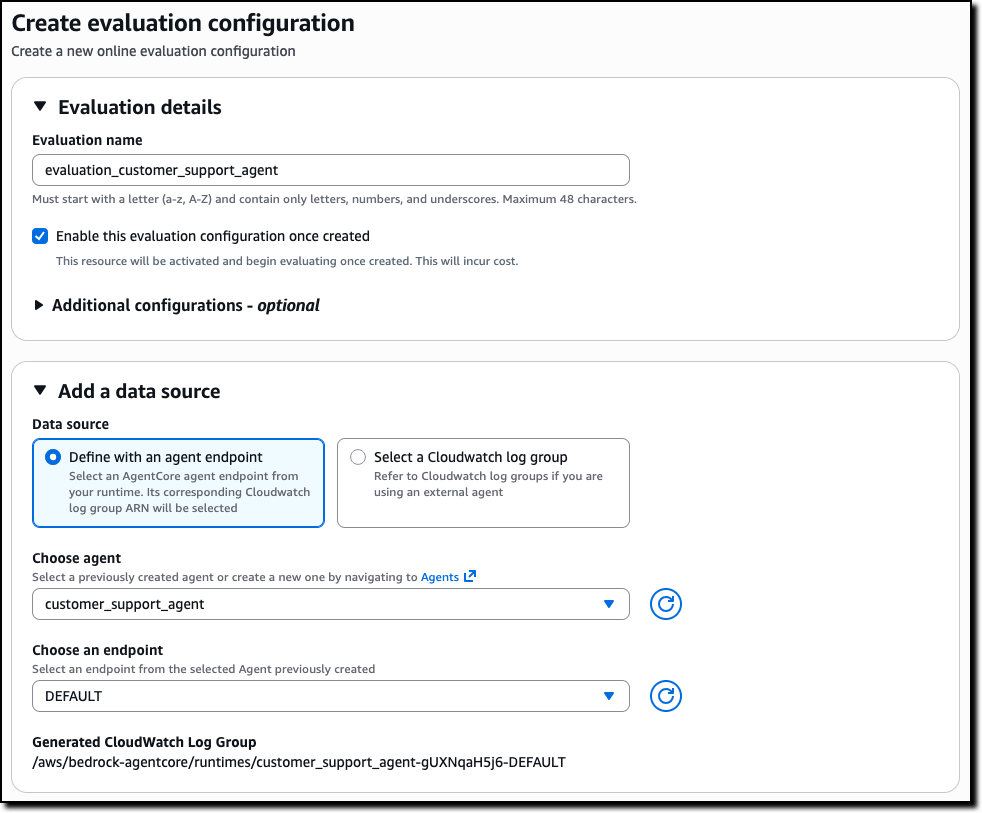
You can create an online evaluation in the new Evaluations section of the AgentCore console. You can use as data source an AgentCore agent endpoint or a CloudWatch log group used by an external agent. For example, I use here the same sample customer support agent I shared when we introduced AgentCore in preview.

Amazon Bedrock AgentCore Evaluations source

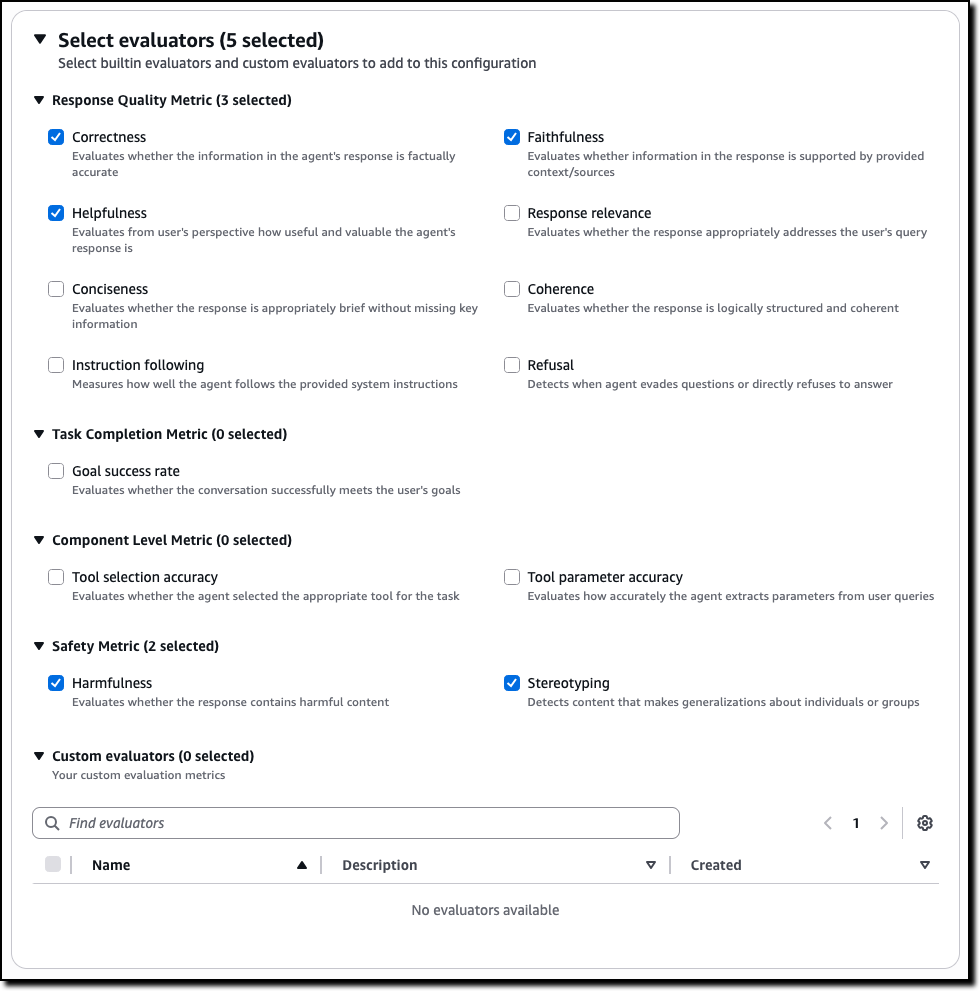
Then, you can select the evaluators to use, including custom evaluators that you can define starting from the existing templates or build from scratch.

Amazon Bedrock AgentCore Evaluations source

For example, for a customer support agent, you can select metrics such as:

  • Correctness – Evaluates whether the information in the agent’s response is factually accurate
  • Faithfulness – Evaluates whether information in the response is supported by provided context/sources
  • Helpfulness – Evaluates from user’s perspective how useful and valuable the agent’s response is
  • Harmfulness – Evaluates whether the response contains harmful content
  • Stereotyping – Detects content that makes generalizations about individuals or groups

The evaluators for tool selection and tool parameter accuracy can help you understand if an agent is choosing the right tool for a task and extracting the correct parameters from the user queries.

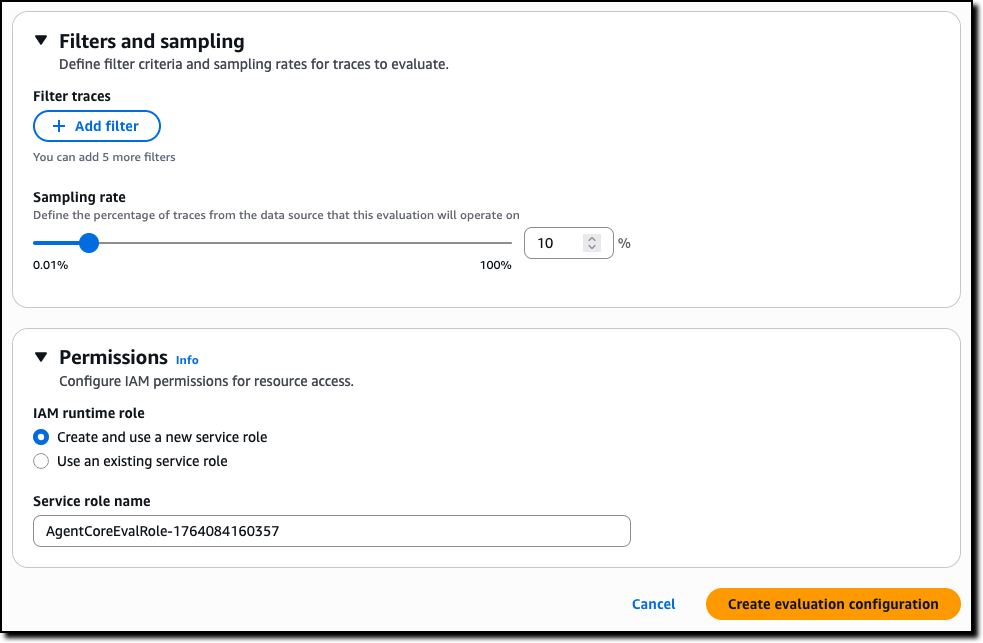
To complete the creation of the evaluation, you can choose the sampling rate and optional filters. For permissions, you can create a new AWS Identity and Access Management (IAM) service role or pass an existing one.

Amazon Bedrock AgentCore Evaluations create

The results are published, as they are evaluated, on Amazon CloudWatch in the AgentCore Observability dashboard. You can choose any of the bar chart sections to see the corresponding traces and gain deeper insight into the requests and responses behind that specific evaluation.

Amazon AgentCore Evaluations results

Because the results are in CloudWatch, you can use all of its feature to create, for example, alarms and automations.

Creating custom evaluators in AgentCore Evaluations
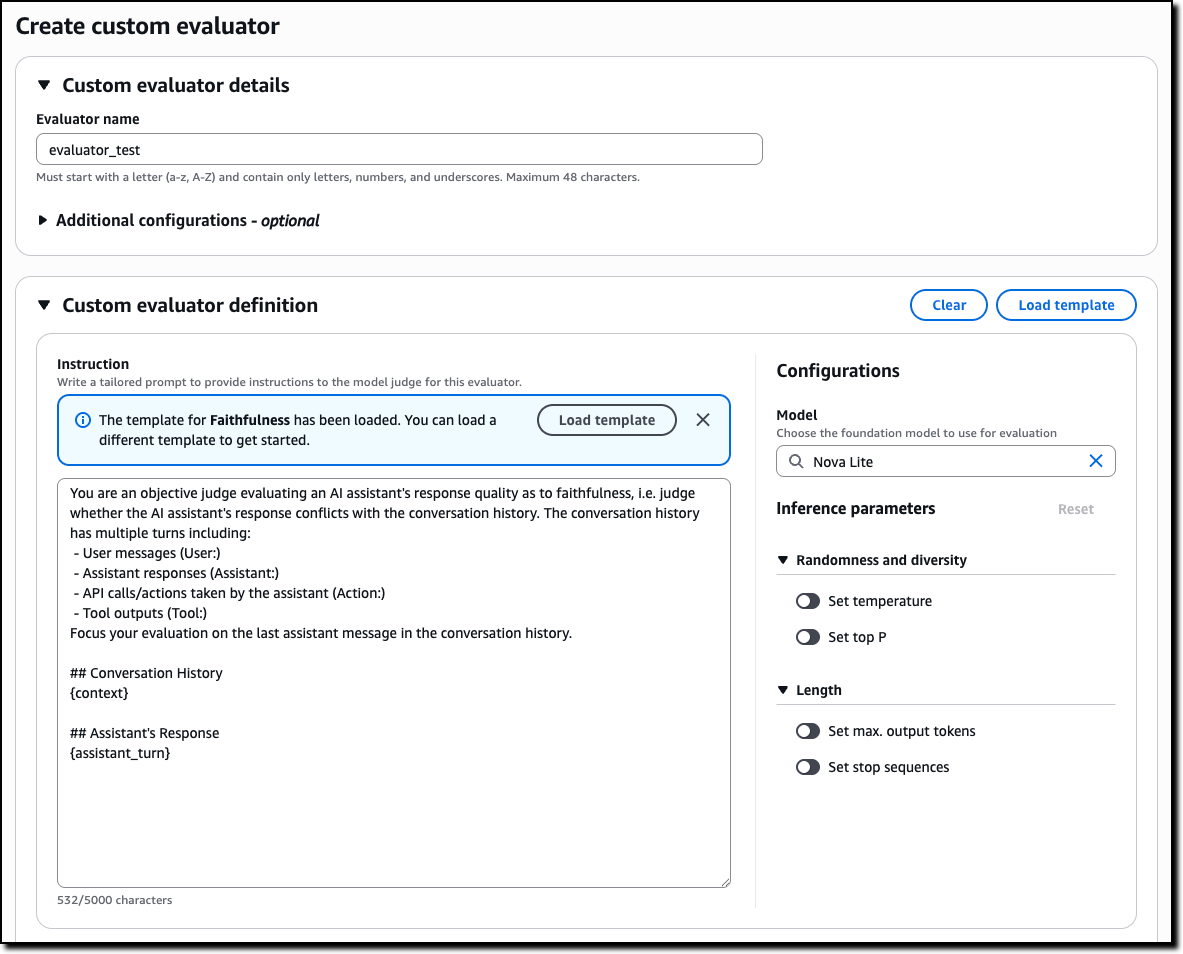
Custom evaluators allow you to define business-specific quality metrics tailored to your agent’s unique requirements. To create a custom evaluator, you provide the model to use as a judge, including inference parameters such as temperature and max output tokens, and a tailored prompt with the judging instructions. You can start from the prompt used by one of the built-in evaluators or enter a new one.

AgentCore Evaluations create custom evaluator

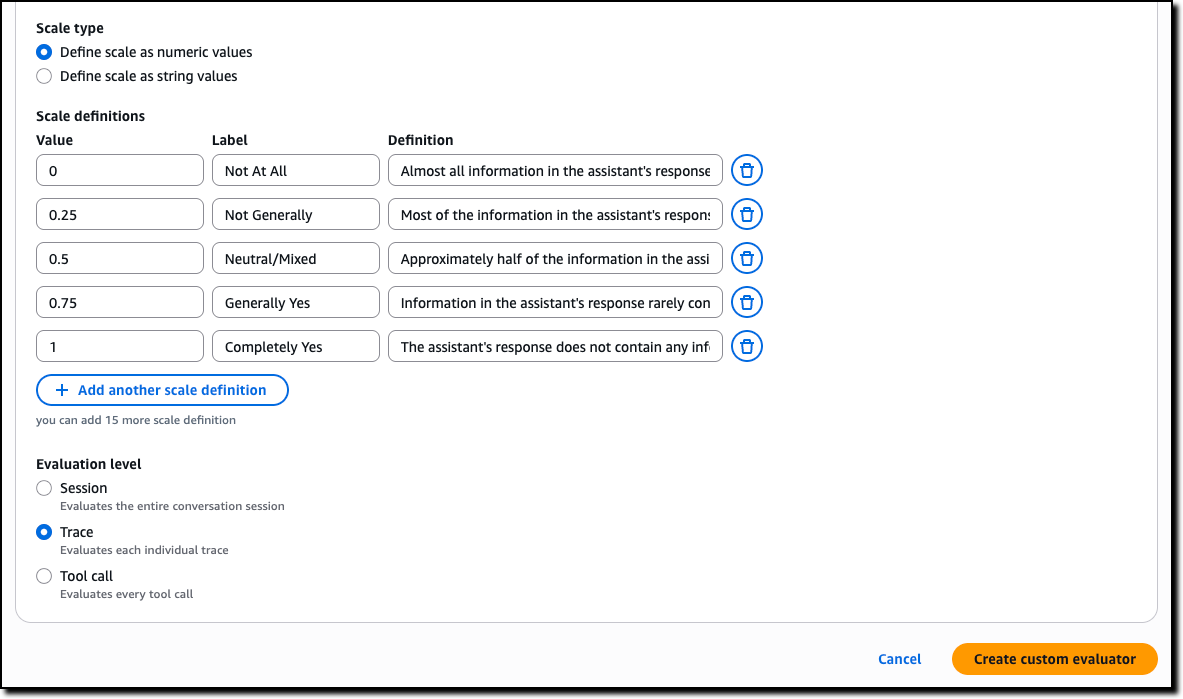
Then, you define the scale to produce in output. It can be either numeric values or custom text labels that you define. Finally, you configure whether the evaluation is computed by the model on single traces, full sessions, or for each tool call.

AgentCore Evaluations custom evaluator scale

AgentCore Memory episodic functionality for experience-based learning
AgentCore Memory, a fully managed service that gives AI agents the ability to remember past interactions, now includes a new long-term memory strategy that gives agents the ability to learn from past experiences and apply those lessons to provide more helpful assistance in future interactions.

Consider booking travel with an agent: over time, the agent learns from your booking patterns—such as the fact that you often need to move flights to later times when traveling for work due to client meetings. When you start your next booking involving client meetings, the agent proactively suggests flexible return options based on these learned patterns. Just like an experienced assistant who learns your specific travel habits, agents with episodic memory can now recognize and adapt to your individual needs.

When you enable the new episodic functionality, AgentCore Memory captures structured episodes that record the context, reasoning process, actions taken, and outcomes of agent interactions, while a reflection agent analyzes these episodes to extract broader insights and patterns. When facing similar tasks, agents can retrieve these learnings to improve decision-making consistency and reduce processing time. This reduces the need for custom instructions by including in the agent context only the specific learnings an agent needs to complete a task instead of a long list of all possible suggestions.

AgentCore Runtime bidirectional streaming for more natural conversations
With AgentCore Runtime, you can deploy agentic applications with few lines of code. To simplify deploying conversational experiences that feel natural and responsive, AgentCore Runtime now supports bidirectional streaming. This capability enables voice agents to listen and adapt while users speak, so that people can interrupt agents mid-response and have the agent immediately adjust to the new context—without waiting for the agent to finish its current output. Rather than traditional turn-based interaction where users must wait for complete responses, bidirectional streaming creates flowing, natural conversations where agents dynamically change their response based on what the user is saying.

Building these conversational experiences from the ground up requires significant engineering effort to handle the complex flow of simultaneous communication. Bidirectional streaming simplifies this by managing the infrastructure needed for agents to process input while generating output, handling interruptions gracefully, and maintaining context throughout dynamic conversation shifts. You can now deploy agents that naturally adapt to the fluid nature of human conversation—supporting mid-thought interruptions, context switches, and clarifications without losing the thread of the interaction.

Things to know
Amazon Bedrock AgentCore, including the preview of Policy, is available in the US East (N. Virginia), US West (Oregon), Asia Pacific (Mumbai, Singapore, Sydney, Tokyo), and Europe (Frankfurt, Ireland) AWS Regions . The preview of AgentCore Evaluations is available in the US East (N. Virginia), US West (Oregon), Asia Pacific (Sydney), and Europe (Frankfurt) Regions. For Regional availability and future roadmap, visit AWS Capabilities by Region.

With AgentCore, you pay for what you use with no upfront commitments. For detailed pricing information, visit the Amazon Bedrock pricing page. AgentCore is also a part of the AWS Free Tier that new AWS customers can use to get started at no cost and explore key AWS services.

These new features work with any open source framework such as CrewAI, LangGraph, LlamaIndex, and Strands Agents, and with any foundation model. AgentCore services can be used together or independently, and you can get started using your favorite AI-assisted development environment with the AgentCore open source MCP server.

To learn more and get started quickly, visit the AgentCore Developer Guide.

Danilo

Editors Note: 1/16/25- AgentCore Evaluation is not available in US East (Ohio). Removed from region list.

Amazon Bedrock adds 18 fully managed open weight models, including the new Mistral Large 3 and Ministral 3 models

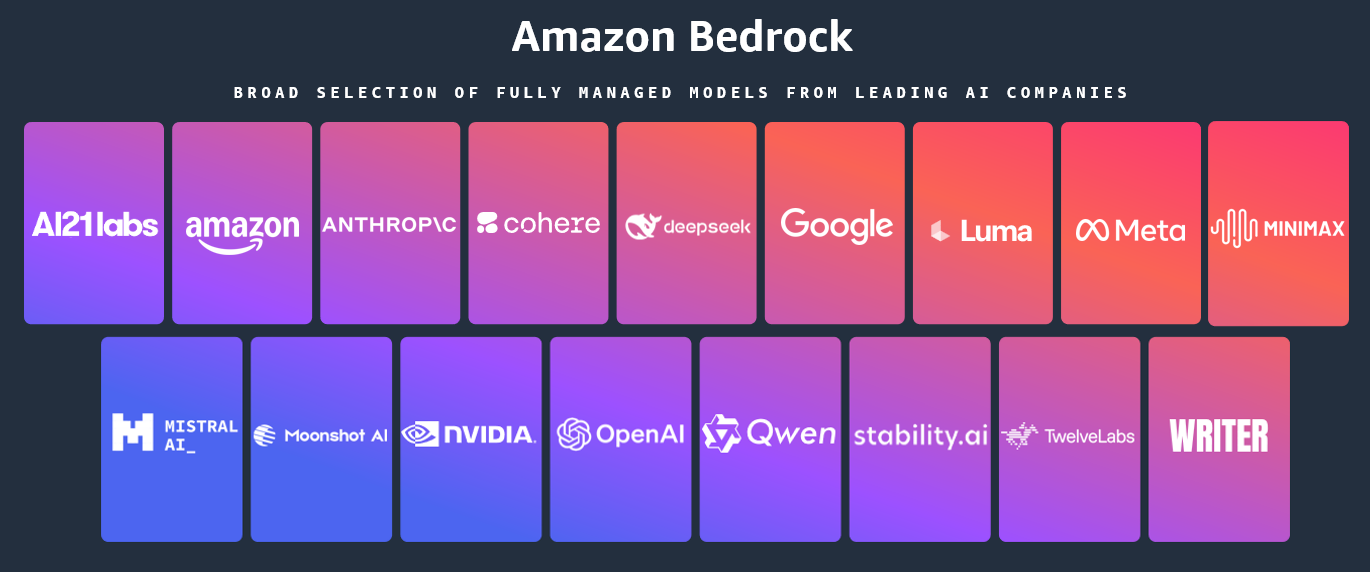
Today, we’re announcing the general availability of an additional 18 fully managed open weight models in Amazon Bedrock from Google, MiniMax AI, Mistral AI, Moonshot AI, NVIDIA, OpenAI, and Qwen, including the new Mistral Large 3 and Ministral 3 3B, 8B, and 14B models.

With this launch, Amazon Bedrock now provides nearly 100 serverless models, offering a broad and deep range of models from leading AI companies, so customers can choose the precise capabilities that best serve their unique needs. By closely monitoring both customer needs and technological advancements, we regularly expand our curated selection of models based on customer needs and technological advancements to include promising new models alongside established industry favorites.

This ongoing expansion of high-performing and differentiated model offerings helps customers stay at the forefront of AI innovation. You can access these models on Amazon Bedrock through the unified API, evaluate, switch, and adopt new models without rewriting applications or changing infrastructure.

New Mistral AI models
These four Mistral AI models are now available first on Amazon Bedrock, each optimized for different performance and cost requirements:

  • Mistral Large 3 – This open weight model is optimized for long-context, multimodal, and instruction reliability. It excels in long document understanding, agentic and tool use workflows, enterprise knowledge work, coding assistance, advanced workloads such as math and coding tasks, multilingual analysis and processing, and multimodal reasoning with vision.
  • Ministral 3 3B – The smallest in the Ministral 3 family is edge-optimized for single GPU deployment with strong language and vision capabilities. It shows robust performance in image captioning, text classification, real-time translation, data extraction, short content generation, and lightweight real-time applications on edge or low-resource devices.
  • Ministral 3 8B – The best-in-class Ministral 3 model for text and vision is edge-optimized for single GPU deployment with high performance and minimal footprint. This model is ideal for chat interfaces in constrained environments, image and document description and understanding, specialized agentic use cases, and balanced performance for local or embedded systems.
  • Ministral 3 14B – The most capable Ministral 3 model delivers state-of the-art text and vision performance optimized for single GPU deployment. You can use advanced local agentic use cases and private AI deployments where advanced capabilities meet practical hardware constraints.

More open weight model options
You can use these open weight models for a wide range of use cases across industries:

Model provider Model name Description Use cases
Google Gemma 3 4B Efficient text and image model that runs locally on laptops. Multilingual support for on-device AI applications. On-device AI for mobile and edge applications, privacy-sensitive local inference, multilingual chat assistants, image captioning and description, and lightweight content generation.
Gemma 3 12B Balanced text and image model for workstations. Multi-language understanding with local deployment for privacy-sensitive applications. Workstation-based AI applications; local deployment for enterprises; multilingual document processing, image analysis and Q&A; and privacy-compliant AI assistants.
Gemma 3 27B Powerful text and image model for enterprise applications. Multi-language support with local deployment for privacy and control. Enterprise local deployment, high-performance multimodal applications, advanced image understanding, multilingual customer service, and data-sensitive AI workflows.
Moonshot AI Kimi K2 Thinking Deep reasoning model that thinks while using tools. Handles research, coding and complex workflows requiring hundreds of sequential actions. Complex coding projects requiring planning, multistep workflows, data analysis and computation, and long-form content creation with research.
MiniMax AI MiniMax M2 Built for coding agents and automation. Excels at multi-file edits, terminal operations and executing long tool-calling chains efficiently. Coding agents and integrated development environment (IDE) integration, multi-file code editing, terminal automation and DevOps, long-chain tool orchestration, and agentic software development.
Mistral AI Magistral Small 1.2 Excels at math, coding, multilingual tasks, and multimodal reasoning with vision capabilities for efficient local deployment. Math and coding tasks, multilingual analysis and processing, and multimodal reasoning with vision.
Voxtral Mini 1.0 Advanced audio understanding model with transcription, multilingual support, Q&A, and summarization. Voice-controlled applications, fast speech-to-text conversion, and offline voice assistants.
Voxtral Small 1.0 Features state-of-the-art audio input with best-in-class text performance; excels at speech transcription, translation, and understanding. Enterprise speech transcription, multilingual customer service, and audio content summarization.
NVIDIA NVIDIA Nemotron Nano 2 9B High efficiency LLM with hybrid transformer Mamba design, excelling in reasoning and agentic tasks. Reasoning, tool calling, math, coding, and instruction following.
NVIDIA Nemotron Nano 2 VL 12B Advanced multimodal reasoning model for video understanding and document intelligence, powering Retrieval-Augmented Generation (RAG) and multimodal agentic applications. Multi-image and video understanding, visual Q&A, and summarization.
OpenAI gpt-oss-safeguard-20b Content safety model that applies your custom policies. Classifies harmful content with explanations for trust and safety workflows. Content moderation and safety classification, custom policy enforcement, user-generated content filtering, trust and safety workflows, and automated content triage.
gpt-oss-safeguard-120b Larger content safety model for complex moderation. Applies custom policies with detailed reasoning for enterprise trust and safety teams. Enterprise content moderation at scale, complex policy interpretation, multilayered safety classification, regulatory compliance checking, high-stakes content review.
Qwen Qwen3-Next-80B-A3B Fast inference with hybrid attention for ultra-long documents. Optimized for RAG pipelines, tool use & agentic workflows with quick responses. RAG pipelines with long documents, agentic workflows with tool calling, code generation and software development, multi-turn conversations with extended context, multilingual content generation.
Qwen3-VL-235B-A22B Understands images and video. Extracts text from documents, converts screenshots to working code, and automates clicking through interfaces. Extracting text from images and PDFs, converting UI designs or screenshots to working code, automating clicks and navigation in applications, video analysis and understanding, reading charts and diagrams.

When implementing publicly available models, give careful consideration to data privacy requirements in your production environments, check for bias in output, and monitor your results for data security, responsible AI, and model evaluation.

You can access the enterprise-grade security features of Amazon Bedrock and implement safeguards customized to your application requirements and responsible AI policies with Amazon Bedrock Guardrails. You can also evaluate and compare models to identify the optimal models for your use cases by using Amazon Bedrock model evaluation tools.

To get started, you can quickly test these models with a few prompts in the playground of the Amazon Bedrock console or use any AWS SDKs to include access to the Bedrock InvokeModel and Converse APIs. You can also use these models with any agentic framework that supports Amazon Bedrock and deploy the agents using Amazon Bedrock AgentCore and Strands Agents. To learn more, visit Code examples for Amazon Bedrock using AWS SDKs in the Amazon Bedrock User Guide.

Now available
Check the full Region list for availability and future updates of new models or search your model name in the AWS CloudFormation resources tab of AWS Capabilities by Region. To learn more, check out the Amazon Bedrock product page and the Amazon Bedrock pricing page.

Give these models a try in the Amazon Bedrock console today and send feedback to AWS re:Post for Amazon Bedrock or through your usual AWS Support contacts.

Channy

Updated on 4 December — Amazon Bedrock now supports Responses API on new OpenAI API-compatible service endpoints for GPT OSS 20B and 120B models. To learn more, visit Generate responses using OpenAI APIs.

❌